
Password Types for Various Income Tax Documents in India
First Startup
May 08, 2026
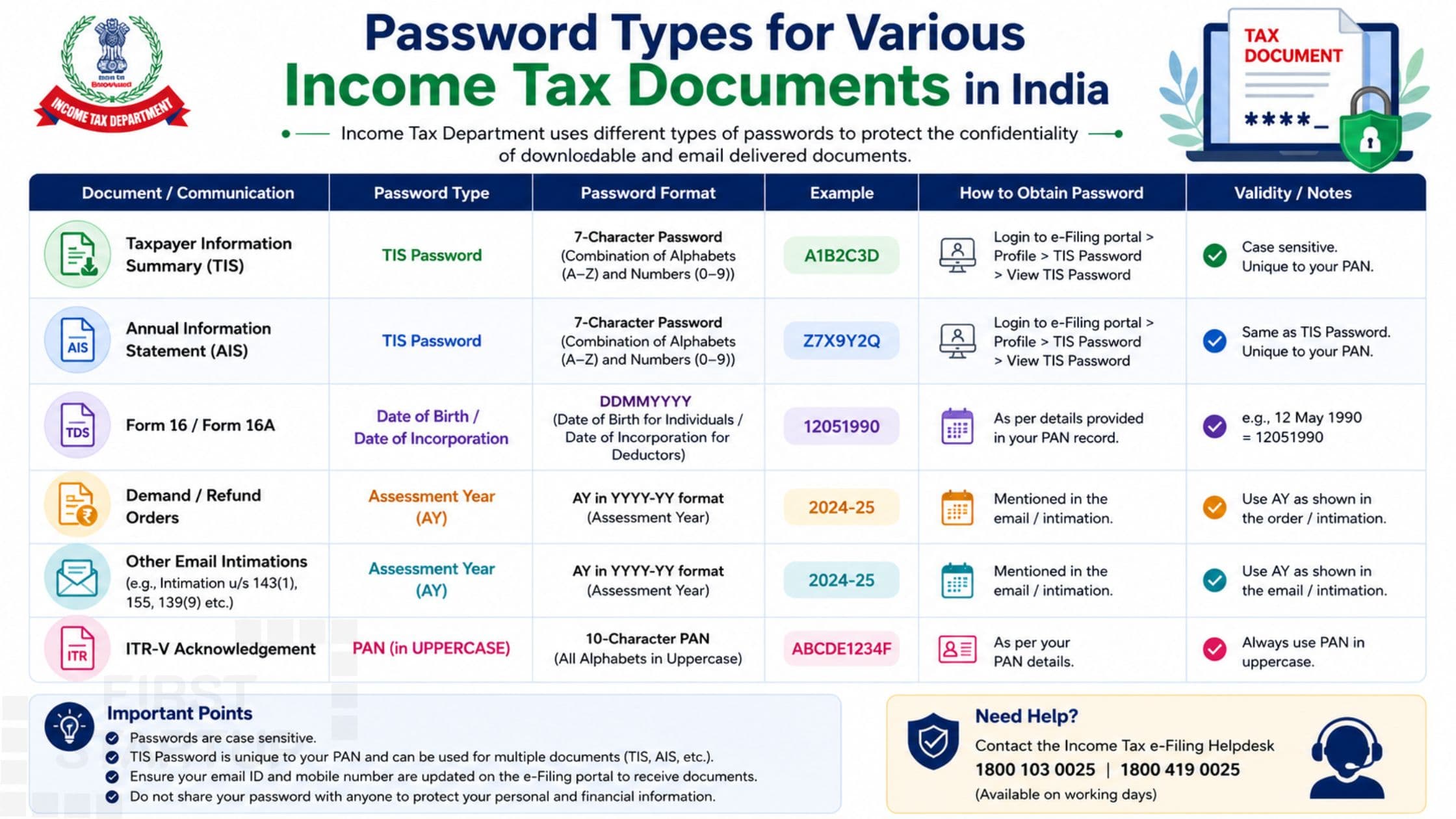
In today’s digital tax system, most Income Tax documents are shared online in password-protected PDF formats to ensure privacy and data security. Whether you download your Income Tax Return (ITR), Form 16, AIS, Form 26AS, or other tax-related files, you may often be asked to enter a password before opening the document.
Many taxpayers get confused about the correct password format for different Income Tax documents. In this detailed guide, we will explain the password types used for various Income Tax documents in India and how to open them easily.
Why Are Income Tax Documents Password Protected?
The Income Tax Department and financial institutions use password protection to secure sensitive taxpayer information such as:
PAN details
Aadhaar-linked information
Salary details
Tax deductions
Income disclosures
Bank account information
Password protection helps prevent unauthorized access and protects taxpayers from identity theft and fraud.
Common Income Tax Documents That Require Passwords
Several tax-related documents are shared in encrypted PDF format, including:
Income Tax Return (ITR-V)
Form 16
Form 16A
AIS (Annual Information Statement)
Form 26AS
TDS Certificates
Intimation Notices
Refund Orders
Tax Audit Reports
Each document may have a different password format depending on the issuing authority.
Password Types for Various Income Tax Documents
Below are the most common password formats used for different Income Tax documents in India.
1. Password for Income Tax Return (ITR-V)
After filing your Income Tax Return online, taxpayers receive an ITR-V acknowledgment in PDF format.
Password Format
Usually, the password is:
PAN number in lowercase + Date of Birth in DDMMYYYY format
ExamplePAN: ABCDE1234F
Date of Birth: 15 August 1995
PAN: ABCDE1234F
Date of Birth: 15 August 1995
Password:abcde1234f15081995
This format is commonly used for downloaded ITR acknowledgments.
2. Password for Form 16
Employers issue Form 16 to salaried employees for TDS and salary tax details.
Common Password Types
Different employers may use different formats, but the most common are:
Format 1:
Employee PAN in lowercase
Format 2:
PAN + Date of Birth
Format 3:
Employee ID + DOB
ExamplePAN: ABCDE1234F
DOB: 01 January 1998
PAN: ABCDE1234F
DOB: 01 January 1998
Password:abcde1234f01011998
Always check the email sent by your employer for the exact password instructions.
3. Password for Form 16A
Form 16A is issued for TDS deducted on non-salary income such as professional fees or rent.
Common Password Format
Typically:
PAN number in lowercase
Or PAN + DOB
Example
Password:abcde1234f
or
abcde1234f01011998
4. Password for AIS (Annual Information Statement)
AIS contains detailed financial transaction information linked to a taxpayer.
Password Format
The AIS PDF password is usually:
PAN in lowercase + Date of Birth
Example
Password:abcde1234f15081995
This is one of the most commonly used formats for Income Tax Department documents.
5. Password for Form 26AS
Form 26AS shows TDS, tax payments, refunds, and other tax-related entries.
Password Format
Most downloaded Form 26AS files use:
Date of Birth in DDMMYYYY format
Example
Date of Birth:
10 June 1990
Password:10061990
In some cases, PAN may also be included.
6. Password for TDS Certificates
TDS certificates issued by banks or institutions may use different password structures.
Common FormatsPAN number
Customer ID
Account Number
DOB
Combination of PAN + DOB
PAN number
Customer ID
Account Number
DOB
Combination of PAN + DOB
Banks usually mention the password format in the accompanying email.
7. Password for Income Tax Notices
Income Tax notices and intimation letters received through email are also password-protected.
Common Password Format
Usually:
PAN in lowercase + Date of Birth
Example
Password:abcde1234f15081995
8. Password for Refund Orders
Tax refund orders received from the Income Tax Department may require passwords.
Password Format
Typically:
PAN number
PAN + DOB
Example:abcde1234f15081995
TIS Password for Income Tax Documents
The Taxpayer Information Summary (TIS) is another important document available on the Income Tax portal. Many taxpayers search for the correct TIS password while opening downloaded PDF files.
What is the TIS password?
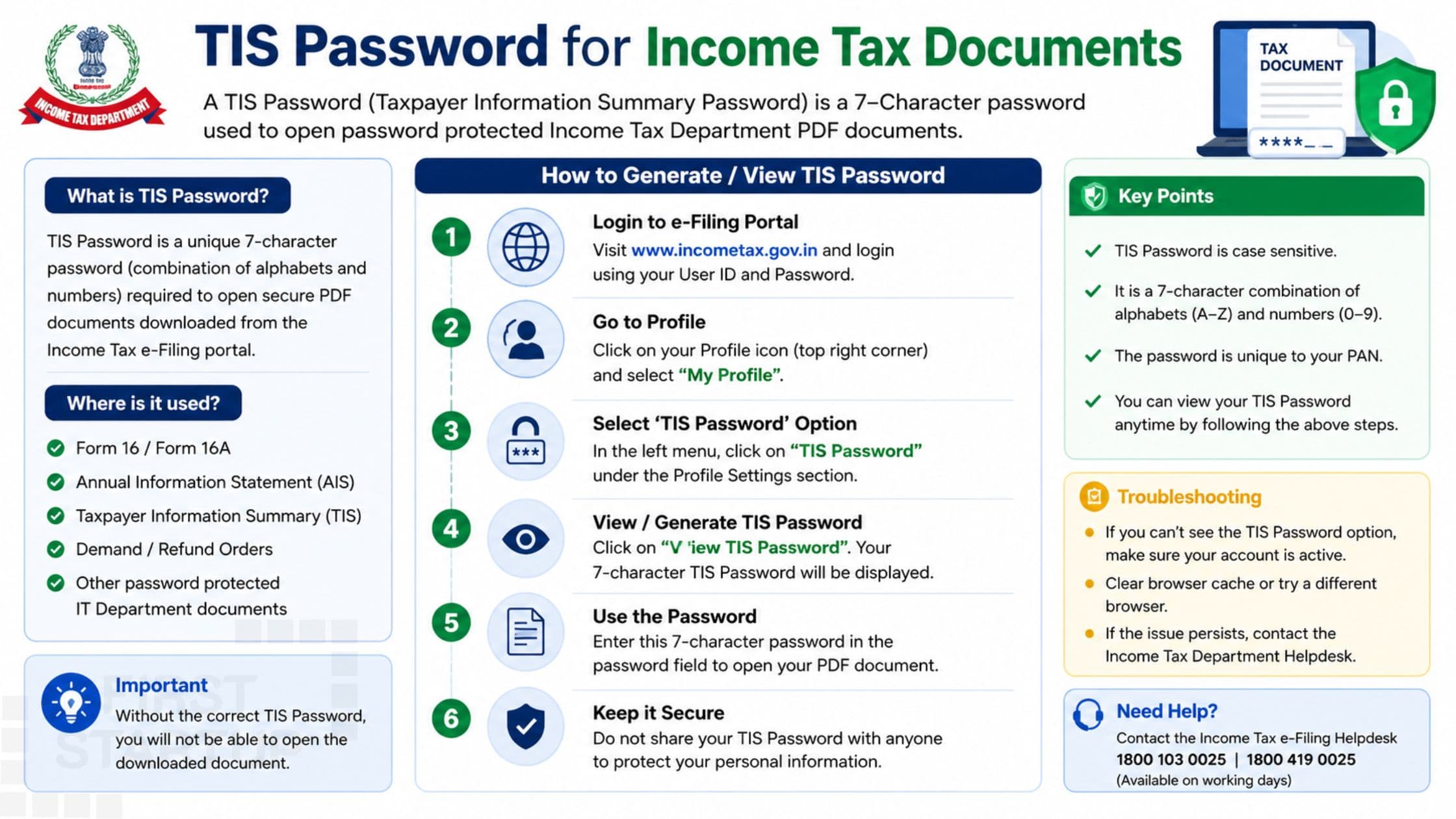
In most cases, the TIS password follows the same format used for AIS and other income tax documents:
PAN number in lowercase + Date of Birth in DDMMYYYY format
Example- PAN: ABCDE1234F
- DOB: 15 August 1995
Password:abcde1234f15081995
The correct tis password helps taxpayers securely access their financial transaction summaries and tax-related information.
How to Open Password-Protected Income Tax PDFs
Follow these simple steps:
Step 1: Download the PDF
Save the document to your mobile or computer.
Step 2: Open the PDF File
Use any PDF reader such as:
Adobe Acrobat Reader
Chrome PDF Viewer
Mobile PDF Apps
Step 3: Enter Password Carefully
Ensure:
PAN is entered in lowercase
DOB format is correct
No spaces are added
Step 4: Access the Document
After entering the correct password, the document will open successfully.
Common Mistakes While Entering Passwords
Many users face password errors due to simple mistakes.
1. Using Uppercase PAN
Most tax documents require PAN in lowercase.
❌ ABCDE1234F
✅ abcde1234f
2. Wrong Date Format
Always use:
DDMMYYYY
Not:
DD/MM/YYYY
MMDDYYYY
3. Adding Spaces
Do not include spaces while entering passwords.
4. Using Incorrect DOB
Ensure you use the date of birth as per PAN records.
What to Do If Password Is Not Working?
If your Income Tax document password is not opening:
Check Email Instructions
The sender usually provides the password format.
Try Alternate Formats
Attempt combinations such as:
PAN only
DOB only
PAN + DOB
Contact Issuing Authority
You may contact:
Employer
Bank
Deductor
Income Tax Department
Tips to Keep Income Tax Documents Secure
Since tax documents contain sensitive financial data:
Never share passwords publicly
Store PDFs securely
Avoid sending tax documents on unsecured platforms
Use encrypted storage
Change email passwords regularly
Importance of Password Security in Tax Documents
Password protection is essential because Income Tax documents include confidential details like:
Income records
Tax payments
Bank details
PAN information
Investment declarations
Secure handling of these documents helps prevent fraud and misuse.
Frequently Asked Questions (FAQs)What is the password for ITR PDF?
Usually:
PAN in lowercase + DOB in DDMMYYYY format.
Example:abcde1234f15081995
Is PAN entered in uppercase or lowercase?
Most Income Tax PDFs require PAN in lowercase.
What is the password for Form 26AS?
Usually your date of birth in DDMMYYYY format.
Can Income Tax PDF passwords vary?
Yes, different institutions may use different password formats.
Why are tax PDFs password-protected?
To secure confidential taxpayer information.
Final Words
Understanding the password types for various Income Tax documents can save time and avoid unnecessary confusion. Most tax-related PDFs use combinations of PAN number and date of birth for security purposes.
Whenever you receive an Income Tax document, carefully read the email instructions and enter the password in the correct format. Proper handling of tax documents also ensures better privacy and protection of your financial information.
If you still face issues accessing your Income Tax files, professional tax experts can help you retrieve and manage your documents securely.