
Income Tax Login Portal
CA Rahul Rajput
May 08, 2026
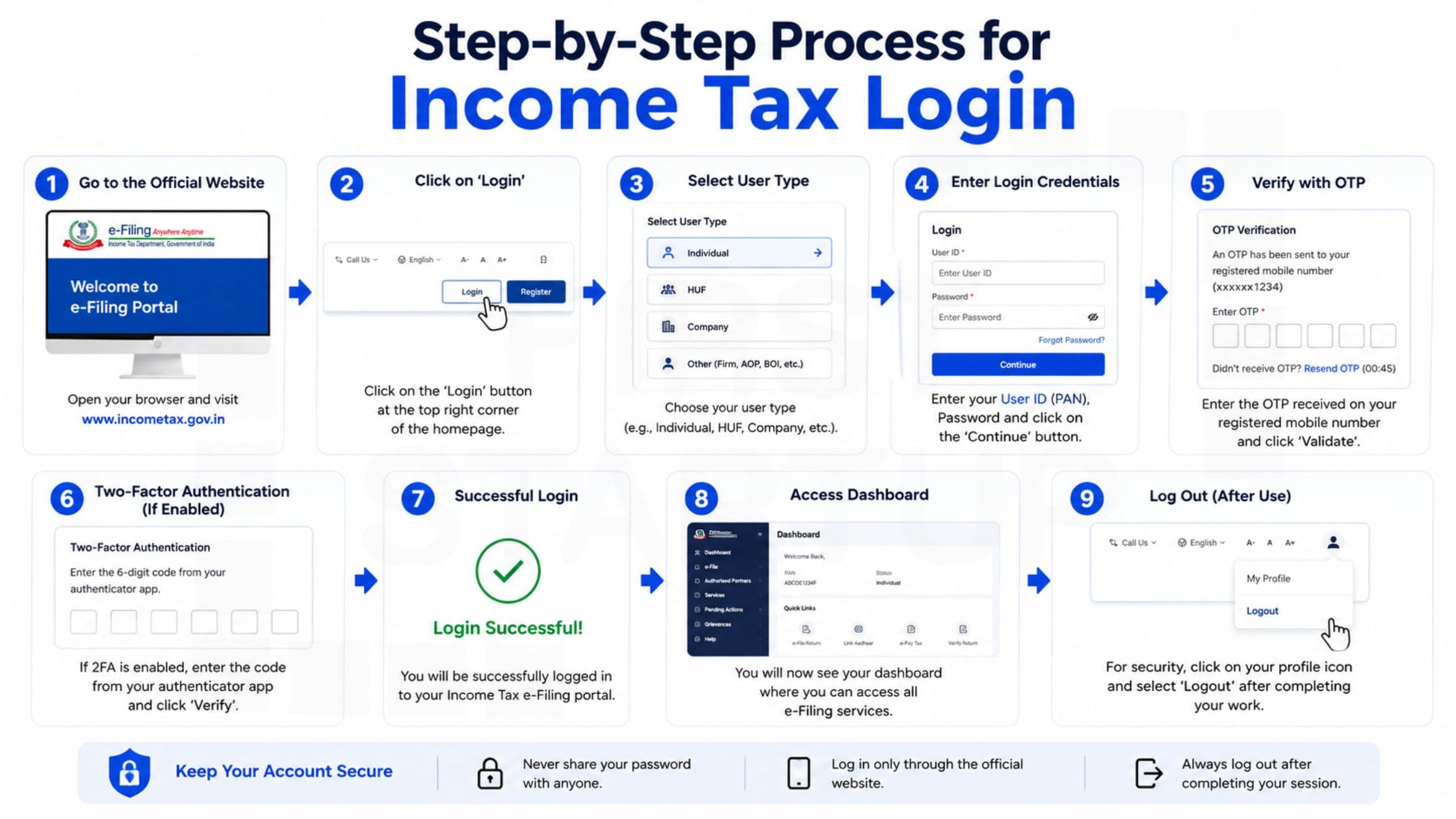
Income Tax Login – Complete Guide to Income Tax Portal Login
Managing taxes online has become simple and convenient with the official Income Tax portal in India. Whether you want to file your Income Tax Return (ITR), verify returns, check refunds, or download tax documents, the income tax login portal allows you to complete everything digitally.
This complete guide explains the income tax login process, income tax portal login steps, income tax e filing login procedure, password reset options, and the key services available on the portal.
What is the Income Tax Login Portal?
The Income Tax Login Portal is the official online platform of the Income Tax Department of India. It helps taxpayers manage tax-related activities online without visiting physical offices.
Official Income Tax Portal Website
The official website for income tax login India services is:
Always use the official government website for secure access to your tax information and e-filing services.
How to Access Income Tax Login Portal
Follow these steps for successful income tax portal login:
Step 1: Visit the Official Portal
Open the Income Tax e filing website. www.eportal.incometax.gov.in
Step 2: Click on Login
You will find the “Login” button on the homepage.
Step 3: Enter User ID
Your PAN number is your User ID for income tax login.
Step 4: Enter Password
Type your registered password carefully.
Step 5: Complete Captcha Verification
Enter the captcha code shown on the screen.
Step 6: Click Login
After successful verification, your dashboard will open.
This process is commonly known as:
income tax india login
e filing income tax login
itr portal login
income tax department login
How to Register on Income Tax Portal
First-time taxpayers must complete registration before using the income tax login portal.
Registration Steps
Visit the official portal
Click “Register”
Select taxpayer category
Enter PAN details
Verify mobile number and email
Create a secure password
Complete registration process
Once registered, you can use your income tax account login anytime.
Services Available After Income Tax Login
After successful income tax login, users can access several important tax services online.
1. File Income Tax Return
Taxpayers can file:
ITR-1
ITR-2
ITR-3
ITR-4
Business and company tax returns
The income tax return login section allows users to file and manage returns online.
2. Check Income Tax Refund Status
Users can track:
Refund processing
Refund approval
Refund credit status
3. Download Form 26AS
Form 26AS includes:
TDS details
Tax payments
Refund information
High-value transactions
4. Verify ITR Online
The portal allows instant ITR verification through:
Aadhaar OTP
Net banking
Bank account verification
Demat account
5. Access AIS & TIS
The portal also provides:
Annual Information Statement (AIS)
Taxpayer Information Summary (TIS)
These documents help taxpayers verify income details before filing returns.
Forgot Income Tax Login Password?
If you forget your income tax login password, follow these steps:
Click on “Forgot Password”
Enter PAN number
Verify identity using OTP
Create a new password
You can reset your password using:
Aadhaar OTP
Registered mobile number
Email verification
Net banking
Common Issues During Income Tax Portal Login
Incorrect Password Error
Check:
CAPS LOCK
PAN details
Password spelling
OTP Not Received
Wait for a few minutes
Check spam folder
Ensure registered mobile number is active
Website Loading Issue
During peak filing season, the income tax portal login system may slow down.
Try:
Clearing browser cache
Using updated browser
Logging in during non-peak hours
Benefits of Income Tax E Filing Login
The income tax e filing login system offers several advantages:
Easy Online Filing
Users can file tax returns from anywhere.
Faster Refund Processing
Online returns are processed faster.
Paperless Tax Compliance
No physical paperwork is required.
Secure Digital Access
The portal uses secure authentication methods.
Centralized Tax Management
All tax-related records remain accessible in one dashboard.
Who Can Use the Income Tax Login Portal?
The portal is useful for:
Salaried employees
Freelancers
Startups
Business owners
Companies
NRIs
Partnership firms
Professionals
Anyone with a valid PAN card can register and use the portal.
Important Documents Required
Keep these documents ready for smooth income tax login and filing:
PAN card
Aadhaar card
Form 16
Bank account details
Investment proofs
Salary slips
Mobile number linked with Aadhaar
Tips for Safe Income Tax Department Login
For secure access:
Use strong passwords
Never share login credentials
Enable OTP verification
Logout after every session
Avoid public Wi-Fi while logging in
Why Income Tax Login Portal is Important
The income tax login portal simplifies tax filing and compliance for Indian taxpayers. Instead of visiting tax offices, users can now manage everything online.
The portal helps taxpayers:
Save time
Avoid late filing penalties
Access tax records instantly
Track refunds easily
Maintain proper compliance
The digital system has made income tax india login services faster, safer, and more efficient.
Frequently Asked Questions (FAQs)
What is the official income tax login portal?
The official portal is the Income Tax Department’s e-filing website.
Is PAN mandatory for income tax login?
Yes, PAN is used as the User ID.
Can I file ITR without login?
No, login is required for filing and verification.
What if I forget my password?
Use the “Forgot Password” option to reset it.
Is income tax e filing login free?
Yes, registration and login are completely free.
Conclusion
The Income Tax Login system has transformed the way taxpayers manage taxes in India. From income tax portal login and income tax return login to refund tracking and document downloads, everything is now available online through the official portal.
Whether you are a salaried employee, freelancer, startup founder, or business owner, understanding the income tax e filing login process is essential for smooth and timely tax compliance.
For secure and hassle-free access, always use the official portal and keep your profile details updated.
Official Website:
Income Tax e-Filing Portal